Demo Scenario
-
The customer here is a retail brokerage firm with customers across the US, Europe and APAC.
-
Data is currently spread over several databases – one for US customer data, one for EU customer data, and a centralized database with information on securities products.
-
The firm’s market data group also has a web service we can query to find the current price of any security.
-
The brokers currently don’t have a way to view data from all of these various databases on a single screen – they need to flip between several different applications, each of which shows data from only one of these data sources.
-
They have requested a new screen for their applications that will display all information for one or more customers (across both the US and Europe) in a single query. They want returned in a single query all the accounts for a given customer – and for each of those accounts, all of the current securities held by that account, with their current price.
-
They also want this screen to be available in each of several applications, so no matter which application they are in they can get to this screen. This actually introduces a lot of complexity, since the applications were developed by several groups, all of whom want the data returned in a slightly different format and protocol – some want the data returned as a hierarchy (customer → account → holdings) while some want all the data in a single flat data structure; and some want native access to the data from their .NET or Java applications, while others want to access the data as a web service.
-
So what the JBoss Data Virtualization data architect needs to do is provide several slightly different versions of the same federated data view for each of these groups.
-
And, they want to make sure that as they solve this tactical use case they build something that can be used as a basis for other future use cases.
Demo Context
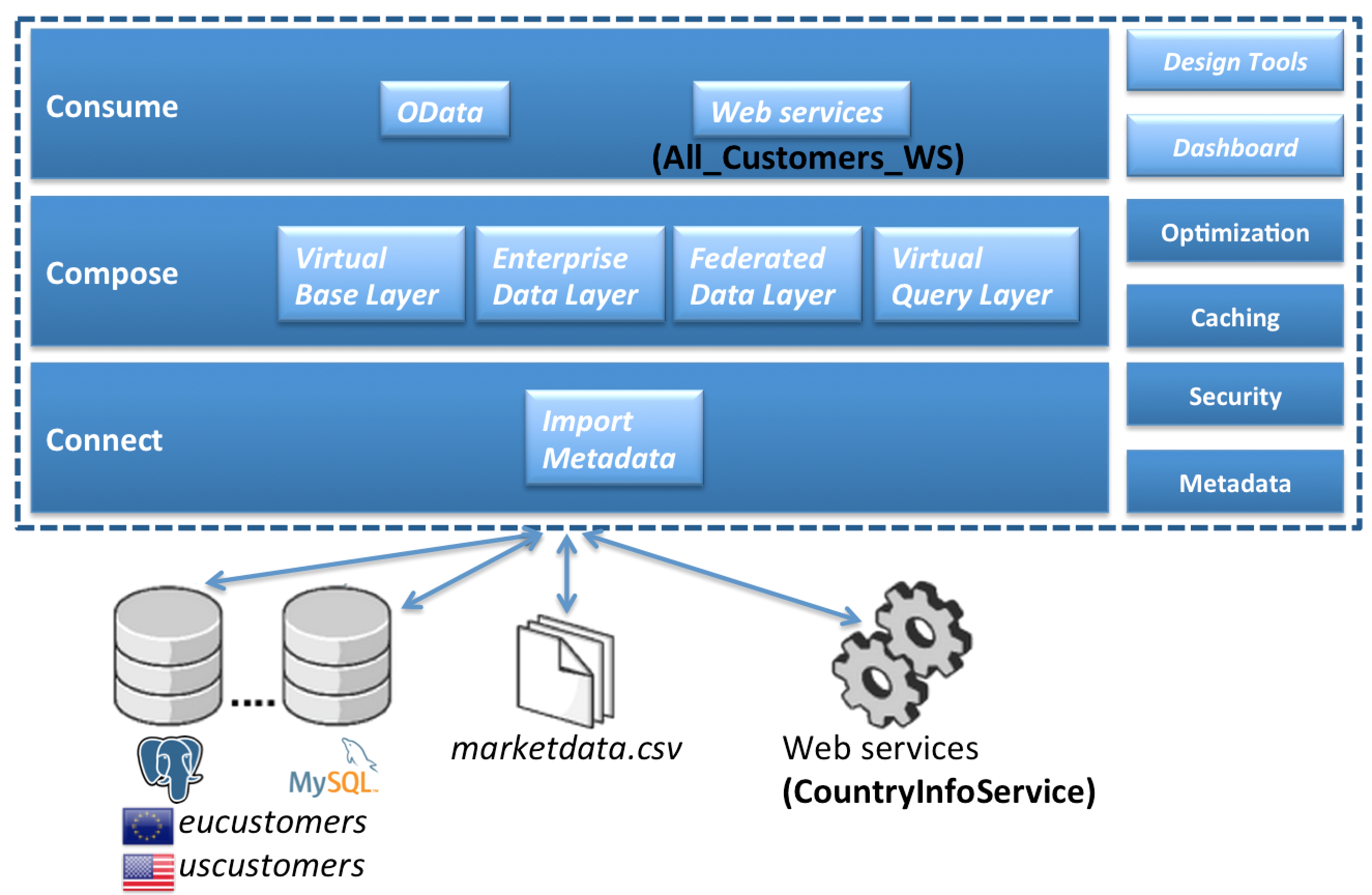
How this is accomplished in JBoss Data Virtualization
Here’s how you can do this in JBoss Data Virtualization, using the Teiid Designer graphical design tool:
Demo Workflow

01 - Import metadata |
02 - Virtual Base Layer |
07 - OData |
03 - Enterprise Data Layer |
10 - Dashboard |
|
04 - Federated Data Layer |
||
05 - Webservices |
||
06 - Deploy VDB |
Import of metadata from data sources
First, they import in the metadata for all of the various data sources into Designer. For the relational databases, Designer does this by connecting to each database via JDBC and importing such metadata as the names of each table in the database, the columns in each of these tables, and the data types of each of these columns. For this use case our relational databases all happen to only have tables, but if they had views or stored procedures, they would have been imported too.
For the stock quote web service, this is done by reading the WSDL for the web service and importing in the schema for the web service request that the service expects, as well as the schema for the response that the web service will retrieve. Since JBoss Data Virtualization uses relational database semantics for both design modeling and its runtime engine, this information appears in Designer as one or more relational tables that represent the the request and response schemas. In this case, a single table is used to represent both the request and response; but more often than not, the importer will create separate tables for the request and response, and if the response has a hierarchical XML schema the response would actually be represented as several tables with primary/foreign key pair relationships – a normalized relational schema.
Build view layers on top of source metadata
Then, they build several layers of view models on top of that data source model. This is a fairly typical JBoss Data Virtualization project, with six layers of view models on top of the data source models – with the transformational logic for each view being fairly simple, and complex data transformations achieved by this use of several layers of such views. Now, in a traditional relational database, such a design would have a fairly heavy performance penalty at runtime to deal with all of these layers of views, which is why in a traditional database you’d see a use case like this defined as a single view defined with a very lengthy and complex SQL statement, but one of the really nice things about JBoss Data Virtualization is that it compresses all of these layers at run time down to a single layer, so there is not really any such penalty to using layered views with JBoss Data Virtualization.
Virtual Base Layer
The first layer we’ve defined here is the Virtual Base Layer. This model layer in most projects is just a series of views that have one-to-one correspendence to each of the source tables. The reason we have this model layer is to provide an abstraction layer to handle any future changes to the data source schemas – if there is such a change, having this layer gives us a place to mask any changes to the actual source schema from the higher level model layers. As you can see, when I double click on the diamond with a T (representing the transformation logic for that view), the language that JBoss Data Virtualization uses to define view transformations is plain old ANSI SQL-92. This is another very nice aspect of JBoss Data Virtualization – we don’t make you learn a new language to define transformations, you just use normal SQL syntax, which is something that we find most data architects are already fairly comfortable with. We find that the learning curve for our SQL dialect is very low for data architects coming from any of the major RDBMS’s (Oracle, DB2, MS SQL, or Sybase), since JBoss Data Virtualization syntax is as I mentioned essentially just ANSI SQL-92, which is a very large subset of the SQL functionality of any of the major databases.
Enterprise Data Layer
The next layer up are the models in the EnterpriseDataLayer folder. What these models do is resolve the slight semantic differences between the eucustomers and uscustomers databases – for example the US version includes a field for middle initial only in the customer table, where the EU version of the customer table has a corresponding field for middle name.
Now, one technique we use here to make resolving these semantic differences a little bit easier here is to convert all of the data types for these tables from the standard SQL datatypes to one of a set of custom datatypes we’ve defined, using JBoss Data Virtualization’s data dictionary capabilities. This way we can ensure that we get all data for a particular field into the same datatype and also gives us a guide to resolving any differences in field names between the two. For example here we convert the EU MiddleName field into something that works for the custom MiddleInitial datatype by using the SQL LEFT function to get just the first character of the middle name. Another nice thing about using custom datatypes is that these datatypes are also used to better describe returned data when JBoss Data Virtualization returns data in XML documents (such as with web services) – we wish we could do this for JDBC and ODBC too, but unfortunately those protocols don’t have a good custom datatype mechanism so we map the custom datatypes into the appropriate standard JDBC/ODBC type at run time when returning data via JDBC or ODBC.
One thing I want to make clear is that there is no hard requirement to define or use a data dictionary with custom datatypes within JBoss Data Virtualization – in fact most of our customers do not use a data dictionary, but instead do this semantic mediation without them (by manually comparing datatypes and field lengths between the two data sources). Our goal with JBoss Data Virtualization is to not impose any roadblocks for those users that want to get their use case resolved with JBoss Data Virtualization as rapidly as possible – so we don’t force any requirement on users to define a data dictionary or a taxonomy or anything like that.
Federated Data Layer
Now, the next three layers of models are in the FederatedDataLayer folder. What we try to do in the mid layer is define a set of standard, generic views of the federated data that are not specific to the requirements of any one use case, but rather are the architect’s data model on how the data from the various data sources should be joined together. Each of these three models federates an additional source to our original model (as we discussed earlier, with JBoss Data Virtualization we try to have each model layer only take a small step towards our eventual goal, and perform complex federations by building multiple layers of models. First we have the AllCustAccts model. What this model does is union together the EU and US customer models to form a federated view of all customers. If we look at the transformation for the account table here, you’ll see again that this is done with some fairly straightforward SQL – this is just a SQL union between the two tables.
Something else I want to show with this table is JBoss Data Virtualization’s capability to perform federated writes. If you see that notation “suid” above the account table, that means that this particular table is configured for not only reads(SQL select), but also for updates, inserts, and deletes. The way this is defined in Designer is by using SQL (more precisely the JBoss Data Virtualization stored procedure language) to define the logic for what an update, insert, or delete means for this particular table, in terms what action should be performed on the layer of models below the current one. And that model layer will have the logic defined for the previous level, and so on down to the model representing the data source. This approach to defining write logic lets us define exactly what a write means even on a table that is built on top of many layers of models or that does complex federation. A good example of the need for this is in the INSERT logic here. If someone does an insert on this table, where should the write go – to the EU database or the US one? Here you’ll see that when an INSERT is done on this table we actually first do a SELECT on the corresponding customer table to determine the geography for the customer referenced in the row to be inserted, and then do the write to the correct database depending on where the customer record is located. JBoss Data Virtualization does all of these federated writes by default as a true XA transaction, so if writes to one source in a federated write scenario aren’t successful then the transaction is rolled back.
Now, if you look at the tables in this All_Customers model you’ll see that not only do we have the account, customer, and accountholdings tables from the previous model layers, but we also have a fourth table that is a flattened representation of the data from all three tables. We do this in order to provide parallel representations of the data as both a normalized relational schema (with three separate tables), and also as a flattened, denormalized view. Starting to build these two parallel representations at this level is useful because it lets us join all of the tables in the EU database together before they are unioned with the US database – this will result in slightly more efficient federated queries at run time than if we were to join the other way around, for those views we may eventually build that are also mostly denormalized.
On top of All_Customers, we might have All_Customers_Products, where we also join in data from the products database (such as the names and ticker symbols for each security), and on top of that we have All_Customers_Products_Values, which also joins in the current value for each security from our web service source. So at this point we have many layers of models, leading up to AllCustAccts_Products_Values, where as you’ll see from this dependency view we have rolled up all of the data from our federated sources to provide the canonical data architect’s representation of the data.
Virtual Query Layer – Web services
If there are web service users that want such a flattened view of the data, we’ve built a web service on top of All_Customers model. These sorts of web services (returning data from a single table) can be built by JBoss Data Virtualization automatically using a web service generation wizard.
We also have this data presented in a hierarchical view in the All_Customers model. If you look at this model, you’ll see that this model represents this data in a hierarchical view, by returning the data as an XML document. This XML document can then be returned back to the end user either via web services built on top of this document, as is done in the All_Customers model, or can be queried via our JDBC driver.
Packaging models in a Virtual Database
And now that all of these services are developed, we package them up in a VDB deployment file , where as we mentioned earlier we specify which models should be included for deployment, and of those which should be visible to end users. For this workshop we only expose the All_Customers model for now.
Have fun with while building the demo scenario yourself.